
Three scenarios in 30 seconds:
- Power outage essentials — Fridge (207W) + router (25W) + lights (30W) = 262W running. Fridge surge = 414W. A 2,048 Wh station lasts roughly 5.5 hours continuous, longer with fridge duty cycle.
- Basement flooding — Sump pump: 1,127W running, 3,381W surge. You need a station with at least 3,400W peak — most mid-range units fail here.
- CPAP overnight — 53W running, no surge. A 288 Wh station lasts 3.8 hours; a 1,070 Wh station lasts 14 hours. Size for the length of the outage, not the wattage.
The five steps below show you how to find these numbers for any device.
Why Bigger Is Not Always Better
The temptation is to buy the largest station you can afford. A 4,096 Wh unit handles everything, right? It does, but it also costs $2,000 to $4,000 and weighs over 60 pounds. If your actual need is keeping a CPAP running for eight hours during an outage, you have spent ten times what a 288 Wh station would cost for a device that sits in the garage too heavy to carry to the bedroom at 2 AM.
The right approach is to match the station to the load, not to guess high and hope for the best. That means understanding five variables: running watts, surge watts, voltage, runtime, and budget. This article walks through each in order, with real data from our database of 49 devices and 33 power stations.
Teaching order vs gate order. In theory, voltage is the fastest disqualifier — if your device needs 240V, only 5 stations qualify and you can stop immediately. But most people don’t know their device wattage yet, so the teaching order starts with running watts (the hardest number to find), then checks surge, then confirms voltage. The result is the same; the path is more practical.
Step 1: Find Running Watts
Running watts tell you how much power a device draws during steady-state operation. This is the number that determines whether the station’s continuous output rating is sufficient and how quickly the battery drains.
Where to find it, in order of reliability:
OEM spec sheet or user manual. The most accurate source. Manufacturers publish exact wattage in installation guides and product pages. Our database pulls from these first.
Device nameplate. The metal or plastic label on the device itself. Look for voltage and amperage, then multiply.
Running watts from nameplate
Running watts = Voltage × Running amps (FLA)
Kill-A-Watt meter. A plug-in device that measures actual draw in real time. Useful for devices where the nameplate is missing or illegible.
ENERGY STAR database. For appliances like refrigerators, ENERGY STAR publishes annual kWh consumption. Divide by 8,766 (hours in a year) to get average watts, then account for duty cycle.
GeneratorChecker database. Our database covers 49 devices with OEM-verified running watts. Use our compatibility calculator for instant results.
Two other common traps. First, multi-voltage labels like “100-240V, 2.0A” (found on laptop chargers) mean 2.0A at the lowest voltage in the range, not at 120V. At 120V, the actual draw is typically 60 to 80W, not 240W. Second, power supply unit (PSU) ratings are ceilings, not draws. A laptop with a 180W adapter rarely pulls more than 60 to 80W during normal use. A desktop with a 750W PSU draws 350 to 500W depending on workload.
Step 2: Determine Surge Watts
Every motor-driven device draws more power at startup than during operation. The complete physics of surge are covered in our dedicated pillar, but the sizing-relevant summary is this: you need to know the surge multiplier for your device’s load profile.
| Load Profile | Surge Multiplier | Buffer | Examples |
|---|---|---|---|
| Resistive | 1.0x | +10% | Space heater, kettle |
| Electronic | 1.0-1.3x | +15% | Laptop, TV, router |
| Motor | 3.0x baseline | +15% | Drill, saw, fan |
| Medical | OEM-specific | +15% | CPAP, nebulizer |
| Compressor | 3.0-5.3x | +25% | Fridge, AC, sump pump |
The multiplier tells you how many times higher the startup spike is compared to running watts. The buffer is the additional safety margin our True Surge Protocol applies to account for cycling, hot restarts, and battery SOC degradation.
If a device nameplate shows LRA (Locked Rotor Amps), multiply by voltage to get the surge figure directly.
Surge watts from LRA
Surge watts = LRA × Voltage
For devices without published surge data, use our LRA-to-surge calculator or look up the device in our compatibility calculator.
Rule of thumb when you have no surge data: assume 3× running watts for any motor or compressor load. This is safe for most household compressors (fridges, window ACs, portable ACs) but can underestimate open compressors like pancake air compressors (actual: 5.15×). Always verify with OEM data when available.
Step 3: Check Voltage
This is the fastest step, but skipping it wastes everything that follows. Four categories of devices in American homes require 240V: central air conditioners, well pumps, electric water heaters, and electric clothes dryers. If your load list includes any of these, only 5 of the 33 stations in our database will work.
Our 120V vs 240V guide covers split-phase power, NEMA connectors, and all five 240V-capable stations in detail. For this article, the relevant point is simple: if the voltage gate fails, stop here. No amount of wattage or battery capacity compensates for the wrong voltage.
Step 4: Calculate Runtime
Once you know the station can start and sustain your devices, the question becomes: for how long?
Runtime formula
Runtime (hours) = Capacity (Wh) × 0.70 / Running watts
Think of 0.70 as “the real AC power you can actually use from the battery.” The rest is lost to inverter efficiency, battery management overhead, and voltage sag under load. This is the same derate factor we use across all runtime calculations on GeneratorChecker. For a deeper explanation, see our watts and watt-hours guide.
Here are three real-world scenarios, calculated with verified data from our database.
Emergency home backup: French door refrigerator (207W running, ~30% duty cycle)
| Station | Capacity | Usable (× 0.70) | Continuous | With 30% Duty Cycle |
|---|---|---|---|---|
| EcoFlow RIVER 2 | 256 Wh | 179 Wh | 0.9 hr | ~2.9 hr |
| Anker SOLIX C1000 | 1,056 Wh | 739 Wh | 3.6 hr | ~11.9 hr |
| EcoFlow DELTA 2 Max | 2,048 Wh | 1,434 Wh | 6.9 hr | ~23.1 hr |
| EcoFlow DELTA Pro 3 | 4,096 Wh | 2,867 Wh | 13.8 hr | ~46.2 hr |
Work from home: laptop + monitor + router (175W total)
| Station | Capacity | Usable (× 0.70) | Runtime |
|---|---|---|---|
| Jackery Explorer 300 Plus | 288 Wh | 202 Wh | 1.2 hr |
| Anker SOLIX C1000 | 1,056 Wh | 739 Wh | 4.2 hr |
| Bluetti AC200L | 2,048 Wh | 1,434 Wh | 8.2 hr |
Medical: CPAP machine (53W, ResMed AirSense 10)
| Station | Capacity | Usable (× 0.70) | Runtime |
|---|---|---|---|
| Anker SOLIX C300 | 288 Wh | 202 Wh | 3.8 hr |
| EcoFlow RIVER 2 Max | 512 Wh | 358 Wh | 6.8 hr |
| Jackery Explorer 1000 v2 | 1,070 Wh | 749 Wh | 14.1 hr |
Step 5: Match to a Power Station
The first four steps define what you need. This step matches that need to a real product. Four tiers cover the vast majority of use cases.
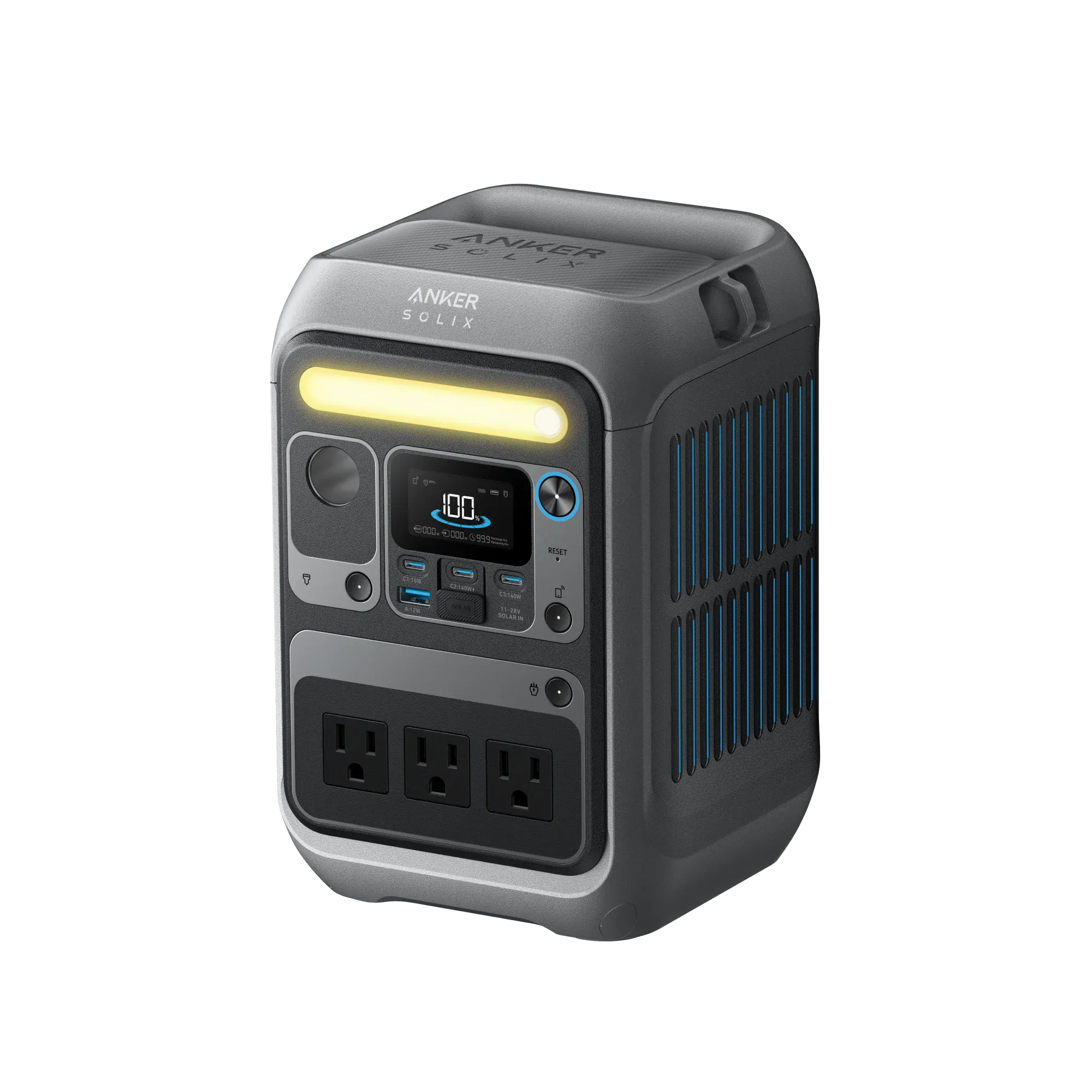
300W continuous, 300W surge (600W with SurgePad), 288 Wh, LFP. At 8 pounds, this is the station you can actually carry to the bedroom at 2 AM. It powers a CPAP for 3.8 hours, charges phones and laptops, and runs LED lights and routers. It cannot start anything with a motor or compressor. For CPAP users who need more runtime, pair it with a USB-C battery bank or consider the next tier.
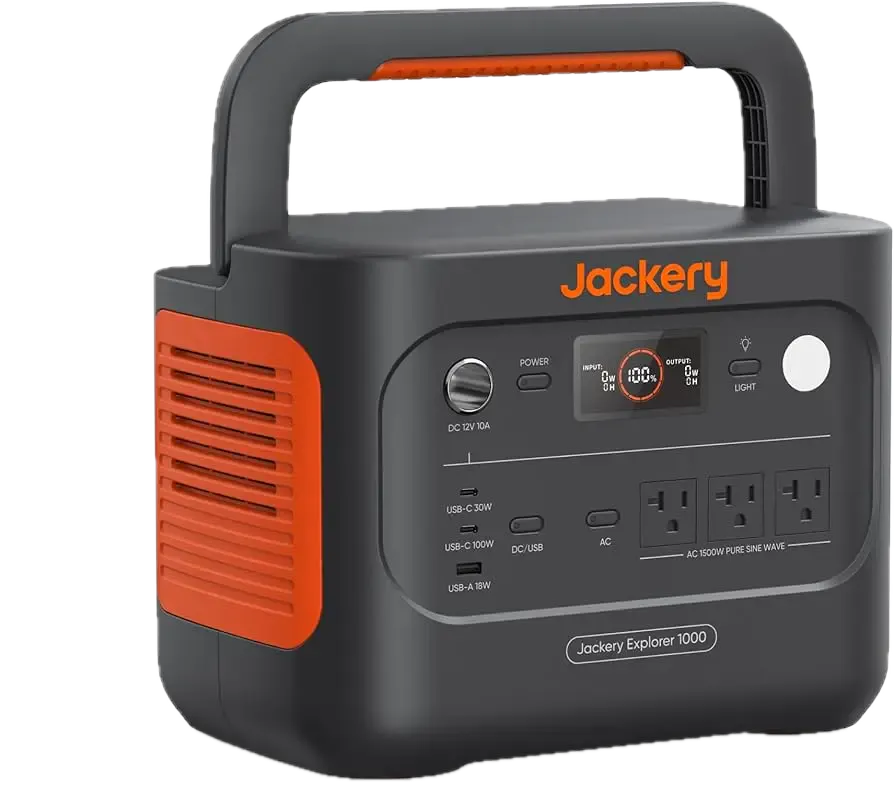
1,500W continuous, 3,000W surge, 1,070 Wh, LFP. The Explorer 1000 v2 is the first tier that handles a refrigerator (414W surge clears the 3,000W peak easily) and keeps it running for roughly 11 to 12 hours with duty cycle. It also powers a space heater (1,500W, no surge) or a microwave for short bursts. It cannot handle a window AC (2,010W surge fits under 3,000W, but the 710W running draw plus other loads may push sustained output above comfortable levels). For more options in this price range, see our best stations under $1,000.
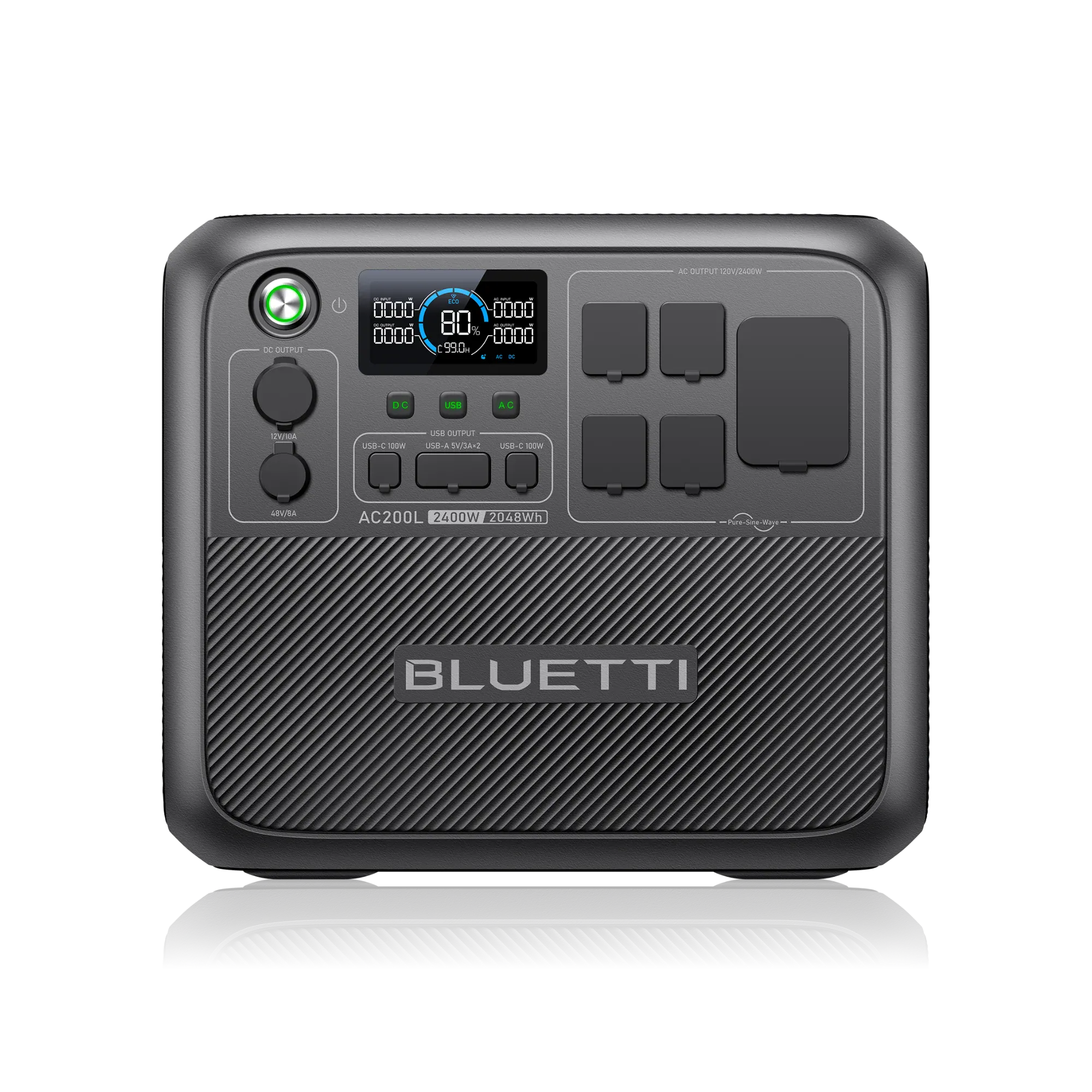
2,400W continuous, 3,600W surge, 2,048 Wh, LFP. The AC200L runs a refrigerator plus lights plus router overnight (roughly 23 hours for the fridge alone at 30% duty cycle). Its 3,600W surge handles a window AC (2,010W) with margin but leaves little headroom for a portable AC (4,071W surge exceeds 3,600W). For the window AC to work reliably alongside other loads, a soft-start device is recommended. See our best home backup stations for a full comparison.
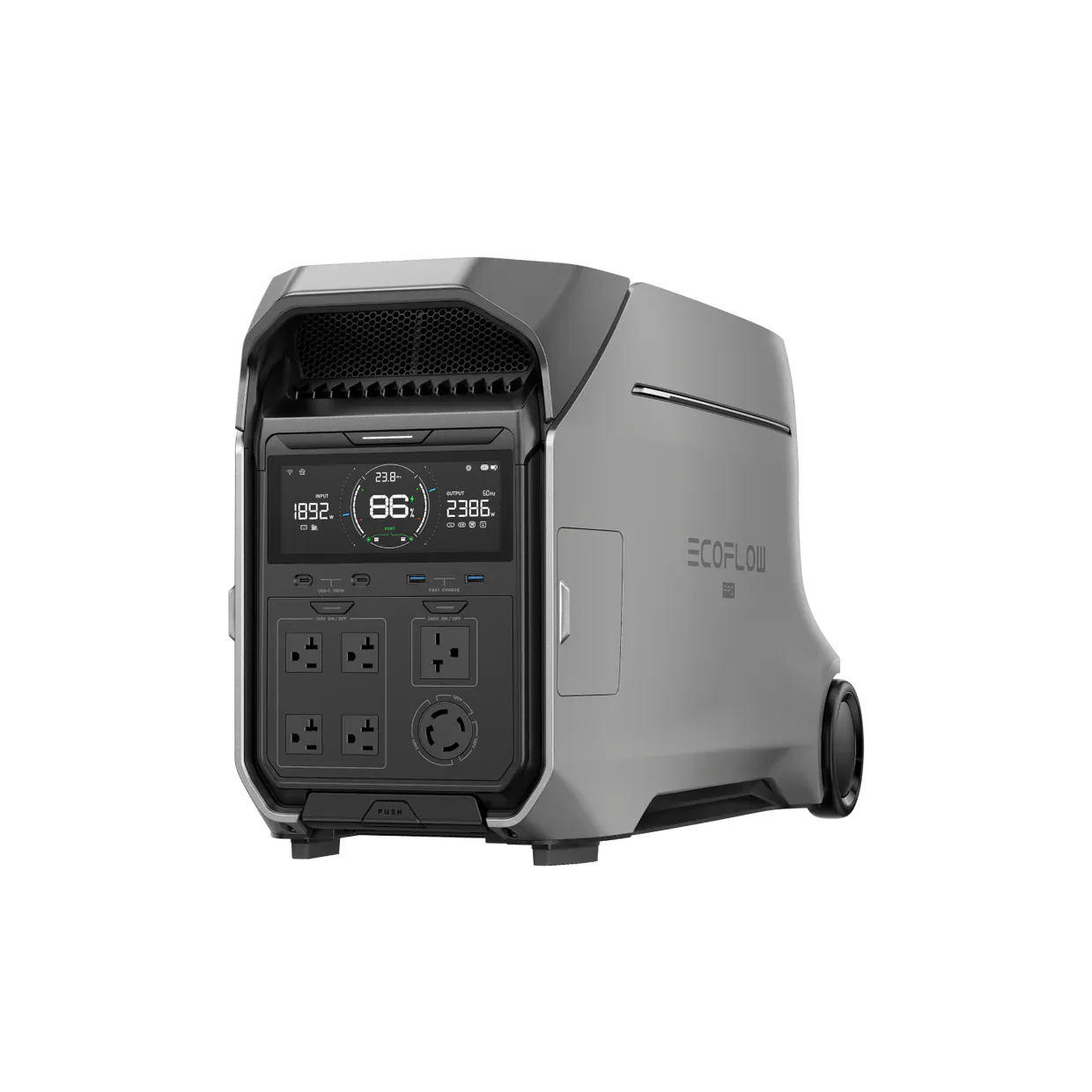
EcoFlow DELTA Pro 3
4,000W continuous, 8,000W surge, 4,096 Wh, LFP, 120V/240V. The DELTA Pro 3 handles multiple simultaneous loads (fridge, sump pump, lights, router) and clears the sump pump’s 3,381W surge with ample margin within its 8,000W peak. It supports 240V output for well pumps and can expand to 8,192 Wh with an additional battery. This is the tier where a single station can carry a household through a multi-day outage. It cannot run a central AC (21,356W surge far exceeds 8,000W peak).
Multi-Device Stacking
Nobody runs one device during a power outage. The refrigerator cycles, the router stays on, lights stay on, and phones charge. The sizing question is not about any single device in isolation. It is about the total load at the worst possible moment.
Here is a realistic outage load stack:
| Priority | Device | Running W | Surge W | Pattern |
|---|---|---|---|---|
| 1 | Refrigerator | 207 | 414 | Cycling (~30%) |
| 2 | Router + modem | 25 | 33 | Always on |
| 3 | LED lights (3 bulbs) | 30 | 30 | Always on |
| 4 | Phone charger | 20 | 26 | 2 hours/day |
| 5 | Sump pump | 1,127 | 3,381 | On demand |
Baseline running load: 207 + 25 + 30 + 20 = 282W. This is the continuous draw when all devices are active and the fridge compressor is running.
Worst-case peak: The sump pump kicks on during a rainstorm while the fridge compressor is running. Total peak at that instant: 282 + 3,381 = 3,663W.
With 25% compressor buffer on the sump pump surge: 3,663 × 1.25 = 4,579W recommended peak. A station with at least 4,800W peak handles this with margin. The EcoFlow DELTA 2 Max (4,800W peak) and the DELTA Pro 3 (8,000W peak) both qualify.
Daily runtime estimate: At the 282W baseline with the fridge at 30% duty cycle, the effective average draw is approximately (207 × 0.30) + 25 + 30 + (20 × 2/24) = 62 + 25 + 30 + 1.7 = 119W. A DELTA 2 Max at 2,048 Wh delivers 2,048 × 0.70 / 119 = roughly 12 hours. A DELTA Pro 3 at 4,096 Wh delivers roughly 24 hours.
Common Sizing Mistakes
PSU watts are not actual draw. A gaming desktop with a 750W power supply unit draws 350 to 500W during intense gaming and 100 to 150W at idle. Sizing the station to the PSU label wastes hundreds of dollars on unneeded capacity.
Ignoring surge causes trips. An 1,800W power station looks sufficient for an 1,100W microwave. But the microwave’s magnetron transformer produces a brief inrush spike that can reach 1,400 to 1,600W. With a 10% resistive buffer, the recommended capacity is 1,600W × 1.10 = 1,760W, which technically fits. But if the station has minimal surge headroom above its continuous rating, the trip is likely. Always check the station’s peak rating, not just continuous.
Continuous runtime calculations are pessimistic. As shown in the runtime tables, a refrigerator at 30% duty cycle runs 2 to 3 times longer than a continuous calculation suggests. Oversizing based on continuous draw means overspending.
Oversizing for weight. The 4,096 Wh station sitting in the garage does not help if you cannot carry it to where you need it. A CPAP user on the second floor needs a 9-pound station on the nightstand, not a 60-pound station two flights of stairs away.
Forgetting expandability. Several stations accept expansion batteries that double or triple capacity without upgrading the inverter. The DELTA Pro 3 expands to 8,192 Wh, the Bluetti AC200MAX reaches 8,192 Wh, and the Zendure V4600 scales to 23,040 Wh. Buy the inverter you need now and add battery later. For more on battery longevity, see our battery degradation guide.
Limitations and Edge Cases
Duty cycle is a moving target. A 30% duty cycle for a refrigerator assumes a climate-controlled kitchen at 68 to 72 degrees. In a summer outage with no AC, kitchen temperatures can reach 85 to 95 degrees. Duty cycle rises to 60 to 70%, cutting the runtime bonus roughly in half. Always estimate for your worst-case scenario, not average conditions.
The 0.70 derate varies with load level. At 60 to 90% of rated load, 0.70 is a reliable derate. At very light loads (below 20% of rated output), the inverter’s fixed overhead power consumption becomes a larger fraction of total draw, and effective derate drops to approximately 0.60. A 4,096 Wh station powering a 25W router is less efficient per watt than the same station powering a 2,000W load.
Battery degradation over time. LFP batteries lose approximately 20% of their original capacity over 3,000 full charge-discharge cycles. A station used daily reaches this point in roughly 8 years. A station used weekly for outages takes decades. By year 5 of moderate use, effective capacity is roughly 85 to 90% of original. By year 10, roughly 80%. Plan for this when sizing for long-term ownership.
Simultaneous loads are not always arithmetic sums. In most cases, adding the wattage of individual devices gives an accurate total. In edge cases involving power factor correction circuits or harmonic interactions between multiple switching power supplies, the actual combined draw can differ slightly from the arithmetic sum. For typical residential loads, this effect is minor and already covered by the safety buffers.
Weight versus portability. This is not a technical limitation but a practical one that belongs in every sizing conversation. A 60-pound station stored in the garage provides zero value during a nighttime outage if nobody can carry it to the bedroom. Consider where the station will be used, not just what it will power.
Key Takeaways
Size by the workflow: running watts, then surge, then voltage gate, then runtime, then budget. Skipping any step risks buying the wrong station.
Find running watts from OEM specs, not breaker ratings or PSU labels. Use nameplate FLA (not circuit amps) multiplied by voltage.
Determine surge from load profile: 1.0x for resistive, 1.0 to 1.3x for electronics, 3.0 to 5.3x for compressors. Use OEM LRA data when available.
Calculate runtime with the formula: Capacity × 0.70 divided by running watts. Adjust for duty cycle (refrigerators, ACs) to avoid pessimistic estimates.
For multi-device scenarios, calculate worst-case overlap: baseline running watts plus the highest single surge that could occur simultaneously. Apply appropriate buffers.
Use our compatibility calculator for instant results across all 33 stations and 49 devices, or browse our best-for pages for pre-calculated recommendations.
Sources and Standards
Device wattage and surge data are sourced from OEM product pages, installation manuals, the NEC 2023 (Article 430 for motors, Article 440 for AC/refrigeration equipment), and the ENERGY STAR database. Power station specifications are sourced from manufacturer product pages and verified against third-party reviews. Buffer factors and the 0.70 derate are derived from our compatibility engine, documented in our True Surge Protocol.
For a complete explanation of our data sourcing and verification process, see our methodology page.